
Table of Contents
Hey! Chris here, with a story about using Claude to compare two financial models at once.
Recently I wrote about how AI modeling saved me 70% on time building summaries.
And I've gotta say, the more I see what AI is capable of, the more I'm going "all in."
And this is coming from an AI hater in the early days. I'll definitely put my hand up and admit that.
My philosophy right now: I will use AI for workflow, but not for communication.
So things like this email you're reading -- written by a good-old-fashioned small-brained human.
But workflow... I'm definitely going to see if AI can be helpful.
Which leads me to today's post... connecting two models at once.
The backdrop: why I needed to compare two financial models
I've been working on a client model that had partial/incomplete data for March - June.
They're in the process of a big data refresh, so we knew "at some point" the whole backend of the model would change.
That day was earlier this week.
First things first, as I've talked about in my program before:
I always have a 50,000ft view of the model that compares a "live case" to a "static case."
(Let's call this the "Variance Report" for the rest of the email).
I will copy/paste values from my current "live case" into the "static case" columns so every variance figure is zero.
That way, any time I make an update, I can see everything that changed. It looks something like this:
An example of a "live case" to a "static case" so I can easily tell what changed. In a "real model," this comparison is much more detailed.
New version & the Claude connection
After a blend of modeling by hand with some AI assistance, "version 2.0" was ready for primetime.
So I looked at my Variance Report, and there were some pretty material changes on the OpEx side.
(Expected, given the incomplete data, but I wanted to understand it better).
Why I couldn't compare two financial models in the same file
Now, my conundrum is: the "old model" has old data, and the "new model" has new data. So there's no way to compare the new model to the old model within the same file.
The old school way: pull up both files, do some nasty INDEX/MATCH stuff by hand, see what kicks out.
Works totally fine, but is slow, and comes with tons of external links.
The new way: a Claude connector that works between two open files.
How to turn on connected files in Claude
If you have two open files at the same time, logged into the same Claude account, this little indicator will appear:
This "Connected files" indicator tells you what other files Claude can access simultaneously, which is great for quickly comparing two models.
And here's how you can enable it in your settings:
Just head to your settings and toggle on "Let Claude work across files." As you can see from the image, it doesn't stop at Excel -- you can have it integrate with your entire Microsoft suite. As always, make sure you have permission from your employer.
Prompting & model review
The prompt I used to compare two financial models
Armed and ready with my friend Claude, now I provide some version of this prompt:
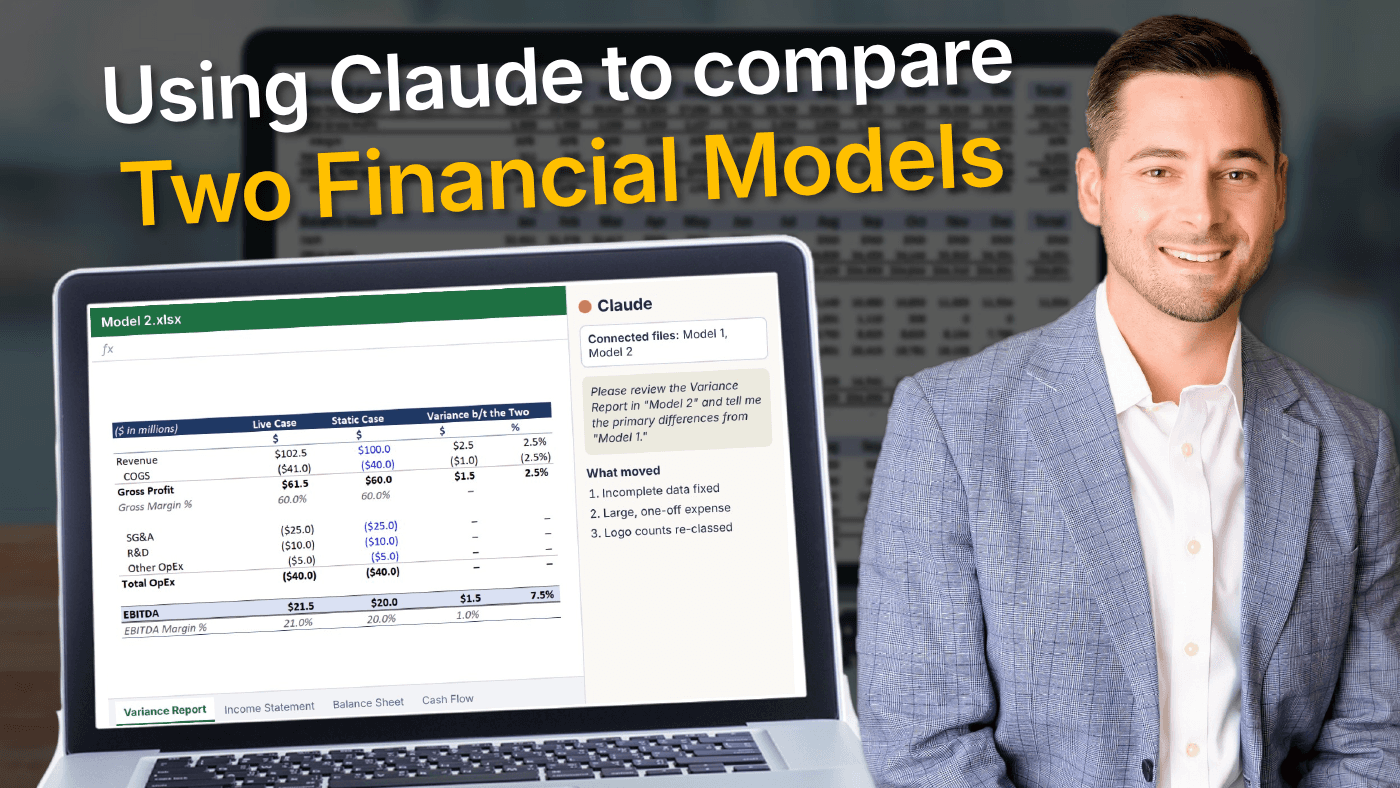
Please review the Variance Report in "Model 2" and tell me the primary differences from "Model 1." The changes are likely due to a data refresh that originally contained incomplete data, but please review & quantify so I can understand what moved. Please completely ignore any possible bias I may have.
So now I sit back, flip between both files, and watch them talk to each other.
Then my emotions creep in -- half amazed, half panicked. The robots are taking over.
I breathe, watch, wait, and tell myself my expertise gives me the ability to oversee what's happening.
What Claude found in under 30 seconds
Not even 30 seconds later, AI has surfaced some really helpful findings:
- Yes, the fixing of incomplete data drove the largest swing (March-June is now complete)
- It flagged a large, one-off expense that I didn't see with my "human review"
- It explained how logo counts changed as certain parts of the business were re-classed
- [Handful of other confidential items]
I'm blown away.
The amount of time I just saved (and client $).
My slow human review
But, as starstruck as I am, this is the exact moment to slow down.
I even get up and walk away from the PC for a minute.
I come back and say to myself, okay, now is the time to review each of these findings, by hand, and make sure I completely understand what is happening.
My litmus test: if a client asked me about it on a call, right now, would I be able to provide the correct answer despite being relatively unprepared? If no, then I have more human work to do.
Right now, I'm even finding myself writing down major findings using pen and paper just to force my brain to take a minute and process things.
Update to the client
Even after taking the time to do my "slow human review," I've still saved time overall, made a better model, and surfaced more valuable things to discuss.
And sticking with my philosophy, I type my email by hand using all my dumb human conventions that AI tells me makes me look weak ("I think we should, sort of, really something, but we can discuss," etc.).
I need this. It's affirmation that I've used a tool to make my work better, not replace me. And it also serves as one final double-check that I actually know what I'm talking about.
This will be critical the next time we chat, because here's what I've noticed -- I understand what AI is doing in the moment -- but ask me for recall a week or two later, and suddenly my mind is blank.
I need traditional, human learning techniques like writing things down and summarizing to really drive home the incremental value I've created.
A note on connecting files
I first learned the idea of connecting files from my friend Dino Bilankov, who showed me how he had an open "template model" alongside a "live model," and this really got me thinking:
When it comes to modeling specifically, instead of creating Claude skills that kind of hide in a black box, what if we created these "template models" that we could always change and update, and simply have our "live model" reference the template via connecting files?
This allows us, as modelers, to fine-tune things in a language we understand. Something that can always be edited.
There could be a future where you receive a raw chart of accounts, open and connect your "template model," and simply instruct AI to build a three statement model in accordance with the template file.
I'm yet to try this, but it's on my list.
Either way, leaning on it this week to compare client models was nothing short of a game changer.
In the right hands, AI is insanely powerful.
Just don't forget the human element as well.
Until next time.
—Chris
Thanks for reading 🙂.
When the time is right, here are some ways I can help you:
- My financial modeling program teaches you to build 3-statement & 13-week cash flow models from scratch; this is the pre-requisite skill that gives me the confidence to use AI.
- I also do consulting work and you can email me directly -- I build custom financial models for FP&A teams (and PE as well).
FAQs
How do you compare two financial models that live in separate Excel files?
I open both files at the same time, logged into the same Claude account, and toggle on "Let Claude work across files" in settings. Then I ask Claude to review the Variance Report in one model and tell me the primary differences from the other.
What is the "Connected files" indicator in Claude?
It appears when you have two files open at the same time under the same Claude account. It tells you what other files Claude can access simultaneously, which is great for quickly comparing two models.
What prompt did you use to compare the two models?
Please review the Variance Report in "Model 2" and tell me the primary differences from "Model 1." The changes are likely due to a data refresh that originally contained incomplete data, but please review & quantify so I can understand what moved. Please completely ignore any possible bias I may have.
What did Claude find when it compared the models?
In under 30 seconds it confirmed the fix to incomplete data drove the largest swing, flagged a large one-off expense I didn't see in my own review, and explained how logo counts changed as parts of the business were re-classed.
Do you still review AI's findings by hand?
Yes. I review each finding by hand until I completely understand it. My litmus test is whether I could give a client the correct answer on a call, right now, while relatively unprepared. If not, I have more human work to do.